Why Every Shopee Video Comes Out Watermarked
Shopee does not give you a video file you can copy. Your browser plays the video from Shopee's media servers, and what you can reach from the page is the player, not the file. Every common workaround captures that player — and that is where the logo, the blur and the stutter come from.
How Shopee adds the watermark
Save or share a clip from the Shopee app and you get a copy with the Shopee logo — and often the uploader's name — stamped on it. That stamp is added to the copy you take away. The upload the product page plays carries no overlay of its own.
Why the "save as" trick gives you a blurry file
Right-click a Shopee video in a desktop browser and there is usually no "Save video as": the player streams the clip instead of pointing at a plain file. So people screen-record it, and a screen recording can only ever be as sharp as the window it filmed — with dropped frames and anything drawn over the player recorded in.
What ShopEDown does differently
ShopEDown reads the media file the page already loaded and saves that file. The watermark you see from other routes comes from how the copy was made — the app's share button or a recorder — not from the video on the listing.
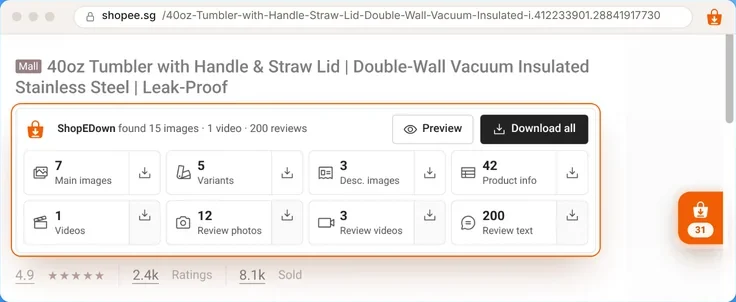
shopee.sg/40oz-Tumbler-with-Handle-Straw-Lid-Double-Wall-Vacuum-Insulated-i.412233901.28841917730





4.9· 8.1k Sold
 Sample listing40oz Tumbler with Handle & Straw Lid | Double-Wall Vacuum Insulated Stainless Steel | Leak-Proof
ShopEDown found 15 images · 1 video · 200 reviews
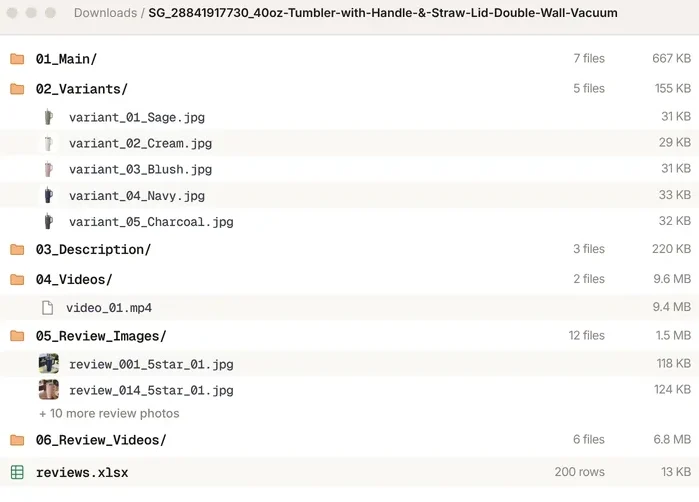
Downloads / SG_28841917730_40oz-Tumbler-with-Handle-&-Straw-Lid-Double-Wall-Vacuum
39 files- 01_Main/
- 02_Variants/
- 03_Description/
- product_info.xlsx
- 04_Videos/
- 05_Review_Images/
- 06_Review_Videos/
- reviews.xlsx
How to Download a Shopee Video Without Watermark (4 Steps)
- 1
Install ShopEDown in Chrome
Install ShopEDown in Chrome, then open any Shopee product page on your computer.
- 2
Open the product page with the video
Look for the ShopEDown card under the product title — it counts what it found: “15 images · 1 video · 2.4k reviews”.
- 3
Click the Videos tile
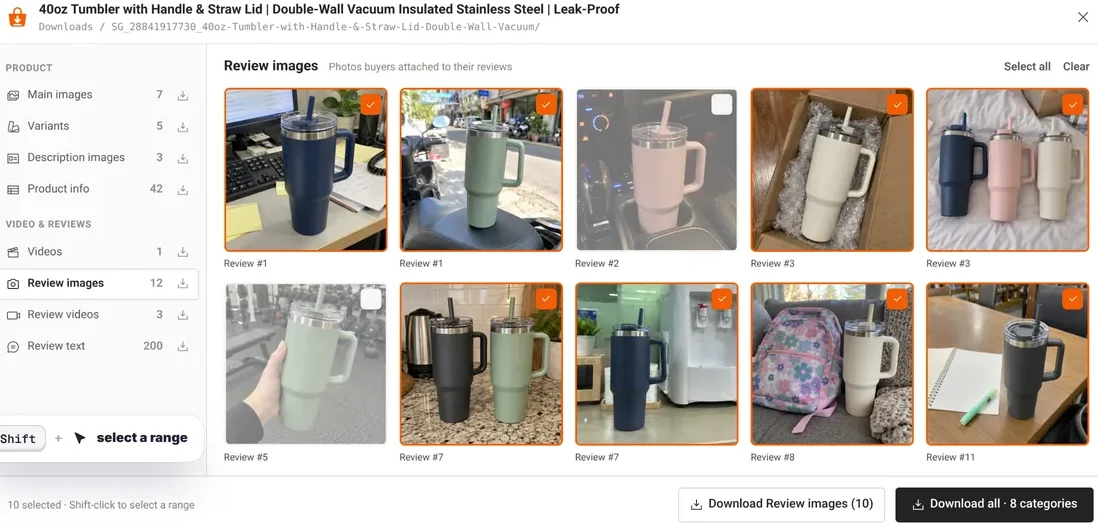
Click the Videos tile. If the listing has more than one clip, click Preview and tick the ones you want.
- 4
Your MP4 is in the product folder
The MP4 lands in the product folder, in the highest resolution the listing has, with its cover image saved beside it.
What You Actually Get: the Original MP4, Not a Screen Recording
- The exact MP4 file Shopee stores, byte for byte
- The highest resolution the listing has — HD when the seller uploaded HD
- No watermark added, no re-encoding, nothing lost in between
- The cover image saved next to each clip
- One folder per product, named like SG_28841917730_40oz-Tumbler
- The 04_Videos sub-folder sits in the same tree as 01_Main … 06_Review_Videos
Buyers' review videos come along too: they land in 06_Review_Videos, numbered to match the review sheet, so review_010_5star_01.mp4 is the clip from review 10. The review text itself goes to reviews.xlsx — see Shopee review export. The gallery and every variant image are one more click away with the Shopee image downloader.
Browser Extension vs. Online Tool vs. Screen Recorder
Link to paste
- ShopEDown (extension)
- None — open the page
- Online paste-a-link tool
- One link per video
- Screen recorder
- None, but you play it through
Watermark
- ShopEDown (extension)
- None added
- Online paste-a-link tool
- Varies by tool
- Screen recorder
- The logo is recorded into it
Quality
- ShopEDown (extension)
- Original file, untouched
- Online paste-a-link tool
- Often re-encoded
- Screen recorder
- Limited by your screen
Speed
- ShopEDown (extension)
- Whole listing, one click
- Online paste-a-link tool
- One video per paste
- Screen recorder
- Real time
Also gets
- ShopEDown (extension)
- Images, variants, reviews, SKUs
- Online paste-a-link tool
- The video only
- Screen recorder
- Just the video
Works on a phone
- ShopEDown (extension)
- No — desktop Chrome and Edge
- Online paste-a-link tool
- Usually
- Screen recorder
- Yes
Online "paste a link" sites work on a phone, which is their real advantage. On a computer, an extension skips the copy-paste round trip and takes the whole listing at once — the images, variants and reviews as well as the video. For a deeper look at the tool itself, see the Shopee video downloader guide.
Does It Lose Quality? No — the File Is Untouched
The file is not processed on the way to your disk — it goes from Shopee's media servers straight to your Downloads folder.
There is no re-encode step, so there is no quality loss: the same resolution and bitrate as the listing serves. When a listing offers several formats, ShopEDown picks the best one — on most HD listings that is a 1080p MP4.
Works on Every Shopee Marketplace
- Singaporeshopee.sg
- Malaysiashopee.com.my
- Indonesiashopee.co.id
- Thailandshopee.co.th
- Philippinesshopee.ph
- Vietnamshopee.vn
- Taiwanshopee.tw
- Brazilshopee.com.br
- Mexicoshopee.com.mx
- Argentinashopee.com.ar
Prices and page language follow the Shopee site you are on. The interface comes in 16 languages.
What This Tool Cannot Do (Read This Before You Install)
- A logo the seller embedded inside the video stays. We save the file, we do not edit it.
- Shopee Video feed clips and Shopee Live streams are not supported — this works on product pages.
- It is a Chrome extension for desktop: Windows, macOS, Linux and ChromeOS. Not on phones.
Watermark inside the video vs. watermark on top of it
A watermark on top is an overlay added when a copy is made — by the app's save button or a recorder. The listing's own file never had it, so saving that file gives you a clean video. A watermark inside the video is different: the seller edited their logo into the frames before uploading. It is part of the picture, and no honest downloader can take it out. If that is what you are trying to fix, read our page on the Shopee watermark remover question first.
Shopee Video feed and Shopee Live: not supported
The short-video feed and live streams are separate parts of Shopee from product pages. ShopEDown saves the product video and the buyers' review videos on a listing; it does not reach the feed or live streams.
Who Downloads Shopee Videos Without Watermark
Shopee affiliates
Save the clip of the product you promote and post it as it is — no stamp from the app across your content.
Cross-border sellers
Relist the same product on another Shopee site with its original video, images and variants in one folder.
Competitor research
Compare how the same product is pitched by different shops — video, images and the reviews buyers left.
Image sets too
The same click saves the gallery and every variant image in full size.
Frequently Asked Questions
Is Shopee video download without watermark free?
ShopEDown saves product images, variants, description images and product info at no cost. Videos, review photos and review exports are part of the paid plans — the full list is in the pricing section on the home page.
Does it remove the Shopee logo from the video?
There is nothing for us to remove: you get the video file the listing serves, without any overlay. If the seller burned a logo into the video itself, that logo is part of the file and stays.
Will the video be lower quality?
No. The file is not re-encoded, so resolution and bitrate match what the listing serves, including HD uploads.
Do I need to paste a link?
No. Open the product page you are already on and click the Videos tile.
Does it work on Shopee Live or the Shopee Video feed?
No. It works on Shopee product pages and saves the product and review videos listed there.
Can I use it on my phone?
Not yet — it is a Chrome extension for desktop. On a phone, the practical route is to open the listing in your phone browser, keep the link, and download it later on a computer.
Is my Shopee account at risk?
Browsing adds no requests to Shopee: the extension reads what the page already loaded. Review features load in small batches about a second apart, and pause for ten minutes if Shopee shows a security check.
Which Shopee sites are supported?
Singapore, Malaysia, Indonesia, Thailand, the Philippines, Vietnam, Taiwan, Brazil, Mexico and Argentina, with local prices.