
What a Shopee Watermark Remover Actually Does
Once a logo is stamped into a video, there is no clean copy hiding underneath it. Every remover does one of three things to the frames:
Blur or mosaic
- What happens
- Smudges the area of the logo
- What it costs you
- A visible blurry patch
Crop
- What happens
- Cuts the corner with the logo off
- What it costs you
- Part of the picture, and the original framing
AI fill
- What happens
- Repaints the area frame by frame
- What it costs you
- Flicker and invented detail on moving shots
All three re-encode the video, so you also lose sharpness on top of the patch.
The Better Route: the Original Shopee Video Has No Logo
The Shopee watermark comes from how a copy is made. Save or share a clip from the Shopee app and the app stamps it. The video the product page plays has no such stamp — it is the seller’s upload, as is.
So if your video is a product video, you don’t need a remover at all. Open the listing on a computer and save the original MP4 with ShopEDown, in the best format the listing has, with nothing re-encoded. The step-by-step guide is on download Shopee video without watermark.
How to Get a Shopee Product Video Without the Logo (3 Steps)
- 1
Find the product page the video came from
Open the Shopee listing on your computer — the video you saved from the app is the listing’s product video.
- 2
Install ShopEDown in Chrome or Edge
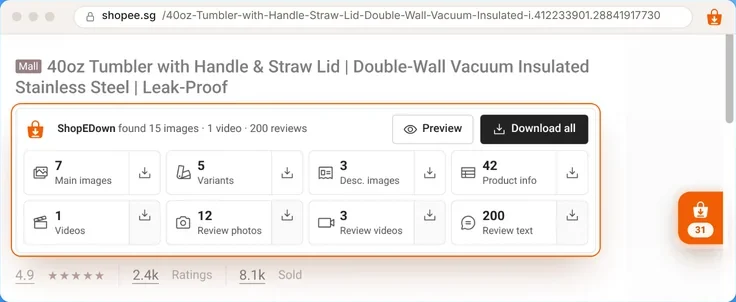
The card under the product title shows whether the listing has a video.
- 3
Click the Videos tile
You get the original MP4 in the best format the listing has — nothing to remove, because nothing was added.
When You Do Need a Remover — and When Nothing Helps
- The seller edited their logo into the video. It is in the original file too. Blur or crop are your only options, and you should ask whether you have the right to reuse it.
- The clip is from the Shopee Video feed or Live, not a product page. ShopEDown can’t reach those. If the product has a listing, its own product video may be the clip you want.
- You only have the file, not the listing. Without the product page there is no original to save; a remover is what is left.
Frequently Asked Questions
Can ShopEDown remove the watermark from a video I already downloaded?
No. It does not edit video files. It saves the original file from the product page, which has no watermark added — so for product videos you can simply download that one instead.
Why does my Shopee video have a watermark?
Clips saved or shared from the Shopee app come out stamped with the Shopee logo, often with the uploader’s name. The file the product page plays does not carry that stamp.
What if the seller’s logo is inside the video?
Then it is part of the picture and stays in every copy, including the original. A remover can only blur or paint over it.
Does this work for Shopee Video feed clips or Live?
No. ShopEDown works on product pages: the product video and buyers’ review videos.
Is it OK to remove a watermark from someone else’s video?
A watermark often marks who made the content. Whatever tool you use, make sure you have the right to reuse the video before you publish it.