
The Comparison at a Glance
There are four common ways to save what a Shopee listing holds. Each one is good at something. This table puts them side by side for a single listing on a computer.
Main images, full size
- ShopEDown (extension)
- Yes, one click
- Online paste-a-link site
- Some tools
- Screen recorder
- No
- Saving by hand
- One by one, often thumbnails
Variant images, named
- ShopEDown (extension)
- Yes, named after the option
- Online paste-a-link site
- Rarely
- Screen recorder
- No
- Saving by hand
- One by one, unnamed
Description images
- ShopEDown (extension)
- Yes, uncropped
- Online paste-a-link site
- Rarely
- Screen recorder
- No
- Saving by hand
- One by one
Product video
- ShopEDown (extension)
- Original MP4, no watermark
- Online paste-a-link site
- Yes, quality varies
- Screen recorder
- Recorded, screen quality
- Saving by hand
- No save button
Review photos & videos
- ShopEDown (extension)
- Yes, numbered by review
- Online paste-a-link site
- Rarely
- Screen recorder
- No
- Saving by hand
- One by one
Reviews to Excel
- ShopEDown (extension)
- Yes, up to 500 per product
- Online paste-a-link site
- Rarely
- Screen recorder
- No
- Saving by hand
- Copy and paste
Review sentiment
- ShopEDown (extension)
- Yes, on every row
- Online paste-a-link site
- No
- Screen recorder
- No
- Saving by hand
- You read them all
Product info & SKUs
- ShopEDown (extension)
- Yes, Excel and CSV
- Online paste-a-link site
- No
- Screen recorder
- No
- Saving by hand
- Copy and paste
Works on a phone
- ShopEDown (extension)
- No, desktop only
- Online paste-a-link site
- Usually
- Screen recorder
- Yes
- Saving by hand
- Partly
Downloading Shopee Product Images
Right-clicking an image on Shopee usually saves the thumbnail the page shows, not the full-size file behind it, and variant images only appear after you pick each option. Saving a 15-image listing by hand takes a few minutes and leaves you with files named after random IDs.
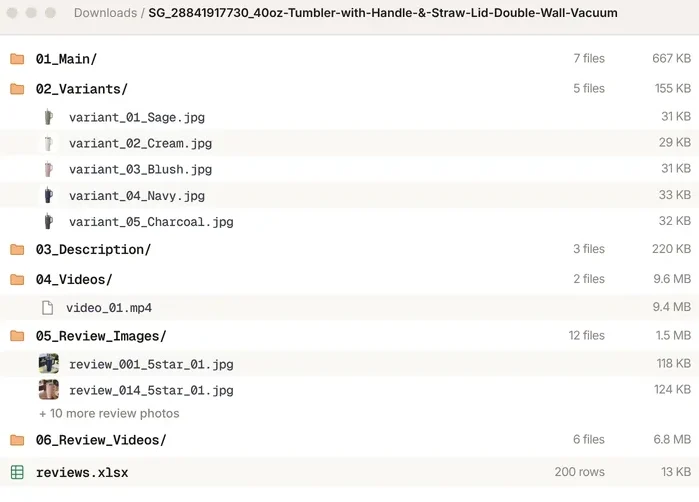
ShopEDown saves the main gallery in its original order, every variant image named after its option (variant_02_Cream.jpg), and the description images below the specs, all at full size. This part is free. More on the Shopee image downloader page.
Downloading Shopee Videos
This is where online tools are strongest: paste the product link, get an MP4. Some return the original file, some re-encode it, and every paste gets you one video. A screen recorder captures your screen, so the result has the player controls and your screen's resolution baked in.
ShopEDown saves the MP4 the listing serves, with its cover image, plus the buyers' review videos. For the full video comparison, see Shopee video downloader online vs. extension.
Exporting Shopee Reviews and Review Analysis
Copying reviews by hand works for ten of them, not two hundred. General-purpose scraper extensions can pull text from a page, but you have to point them at the right elements and they don't page through Shopee's reviews for you.
ShopEDown exports up to 500 reviews per product to Excel and CSV, one row per review, with a sentiment label on every row and a summary sheet. You can export only 1 to 3 star reviews to read the complaints. The review export comparison goes into detail.
Product Data and SKUs
For product research you want the numbers in a sheet: title, price, sales, rating, shop and every SKU with its own price and stock. Online video tools don't do this, and copying it by hand from each variation is slow. ShopEDown writes it to product_info.xlsx and .csv in the product's folder, at no cost. See the Shopee scraper page.
How to Try It on a Listing
- 1
Add ShopEDown to Chrome or Edge
Install it from the Chrome Web Store. Images and product data need no account.
- 2
Open any Shopee product page
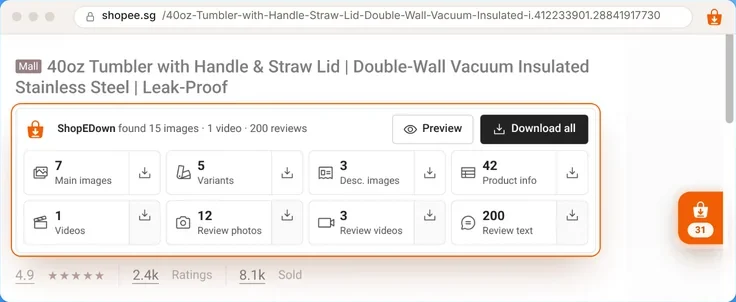
The ShopEDown card under the title counts the images, videos and reviews the page holds.
- 3
Click a tile
The files land in one folder per product, sorted into numbered sub-folders.
Where ShopEDown Is Not the Right Tool
- On a phone. It is a desktop extension. Use a paste-a-link site, or save the listing later on a computer.
- Crawling many products. It works on the product page you have open, one at a time. It does not scrape search results or lists of URLs.
- Shopee Live and Shopee Video feed clips. It works on product pages only.
Frequently Asked Questions
What is the best Shopee downloader?
It depends on the device and the file. On a phone, an online paste-a-link site is the only option that works. On a computer, a browser extension like ShopEDown saves images, videos, reviews and product data from the page you have open, in one click and one folder.
Is there a free Shopee downloader?
Yes. ShopEDown saves main images, variant images, description images and product info at no cost. Product videos, review photos and videos, review export and sentiment are part of the paid plans. Online sites are usually free for videos, with ads.
Can an online tool download Shopee images and reviews too?
Most online Shopee downloaders handle a single video from a pasted link. Few save the full image gallery with variants, and exporting reviews to a spreadsheet is rare among them. Check what a tool actually returns before you rely on it.
Does ShopEDown work on a phone?
No. It is a desktop extension for Chrome and Edge on Windows, macOS, Linux and ChromeOS. On a phone, use a paste-a-link site, or open the listing later on a computer.