
The Short Answer
Main images, full size
- Free
- Yes, unlimited
- Pro
- Yes
Variant & SKU images
- Free
- Yes, unlimited
- Pro
- Yes
Description images
- Free
- Yes, unlimited
- Pro
- Yes
Product info & every SKU
- Free
- Yes, unlimited
- Pro
- Yes
Product videos (MP4, no watermark)
- Free
- No
- Pro
- Yes
Review photos & videos
- Free
- No
- Pro
- Yes
Review export & sentiment
- Free
- No
- Pro
- Yes
Download all in one click
- Free
- No
- Pro
- Yes
Account needed
- Free
- No
- Pro
- Yes
Pro is $7.99 a month or $79.99 once for lifetime. We would rather you know that now than find out after installing.
Free Ways to Download a Shopee Video — and Their Catch
If you want the video and nothing else, at no cost, these are the real options:
Online paste-a-link sites
Copy the product link from the Shopee app, paste it into a downloader site, save the result. Free, and they work on phones. The catch: one video per paste, ads, and some re-encode the file — check the resolution of what you get.
Screen recording
Free and built into most phones and computers. The catch: you record the player, so you get your screen’s resolution, the player controls and anything drawn over the video, in real time.
ShopEDown’s free tier, for everything else
It won’t save the video, but it does save the listing’s images, every variant photo, the description images and the product data in full quality — which is often the larger part of what you need to relist or research a product.
Why Video Is Part of Pro
Saving the original MP4 means finding the best format the listing serves and fetching it untouched — the same for the buyers’ review videos, numbered to match the review sheet. It is the part of ShopEDown that takes the most work to keep running as Shopee changes, so it sits in Pro together with the review tools. What you get is described on download Shopee video without watermark.
How to Start With the Free Tier
- 1
Add ShopEDown to Chrome or Edge
No account needed for the free features.
- 2
Open a Shopee product page on your computer
The card shows everything the listing has, including its video, before you download anything.
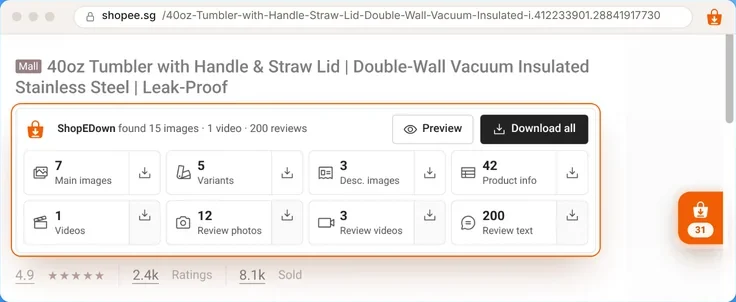
- 3
Click Main images, Variants, Description images or Product info
Those sets save free and unlimited, into one folder per product.
Frequently Asked Questions
Is there a free Shopee video downloader?
Free online paste-a-link sites exist and screen recording is free. ShopEDown’s video download is part of Pro; its free tier covers images, variant images, description images and product info.
Do I need an account for the free tier?
No. Install the extension and use the free features without signing in, with no limit.
Is there a trial of Pro?
Instead of a trial there is a 7-day money-back guarantee: email support@shopedown.com within seven days of paying and the payment is refunded in full, no reason needed.
What does Pro cost?
$7.99 a month, or $79.99 once for lifetime access. Payment is handled by Waffo, our Merchant of Record, and every order’s receipt is listed in Settings → Payments.
Can I cancel any time?
Yes. Cancel the monthly plan from Settings → Billing; Pro stays on until the period you paid for ends. Lifetime never renews.