
Three Ways to Export Shopee Reviews
Setup
- ShopEDown
- None, open the product page
- General scraper extension
- Pick the elements to collect
- Copy and paste
- None
Pages through reviews
- ShopEDown
- Yes, up to 500
- General scraper extension
- Depends on your setup
- Copy and paste
- By hand
Columns
- ShopEDown
- Stars, text, variation, buyer, date, likes, seller reply
- General scraper extension
- Whatever you mapped
- Copy and paste
- Whatever you copy
Only 1 to 3 star reviews
- ShopEDown
- One switch
- General scraper extension
- Filter afterwards
- Copy and paste
- Scroll and pick
Sentiment
- ShopEDown
- On every row, plus a summary
- General scraper extension
- No
- Copy and paste
- No
Review photos & videos
- ShopEDown
- Saved, numbered to match rows
- General scraper extension
- Links at most
- Copy and paste
- One by one
Output
- ShopEDown
- Excel and CSV
- General scraper extension
- CSV or Excel
- Copy and paste
- A document
Copying Reviews by Hand
Fine for a quick look at ten reviews. Past that, it is slow, you lose the star rating and variation unless you type them in, and Shopee shows its best reviews first, so the complaints you are looking for sit deep in the list.
General-Purpose Scraper Extensions
Point-and-click scrapers can collect almost anything from a web page, which makes them flexible. For Shopee reviews, the work is in the setup: choosing the right elements, getting it to page through the reviews, and cleaning the columns afterwards. They give you text; they don't label sentiment or save the buyers' photos.
ShopEDown: Built for Shopee Reviews
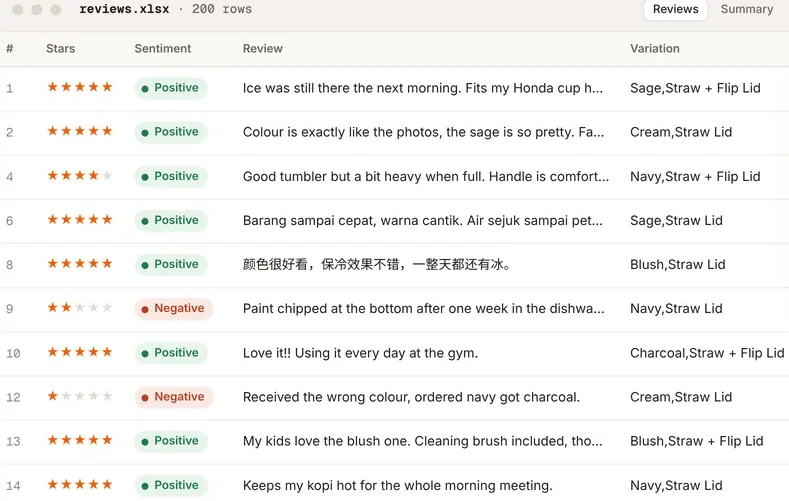
ShopEDown knows where a Shopee listing keeps its reviews, so there is nothing to set up. One click writes reviews.xlsx and .csv: one row per review with stars, text, the variation bought, buyer, date, likes and the seller's reply, plus a sentiment label. A summary sheet gives the average rating and the positive/negative split.
Review photos and videos are saved alongside, numbered to match the rows, so a complaint in row 22 leads straight to review_022_2star_01.jpg. More on the Shopee review downloader page.
How to Export Shopee Reviews with ShopEDown
- 1
Open the product page
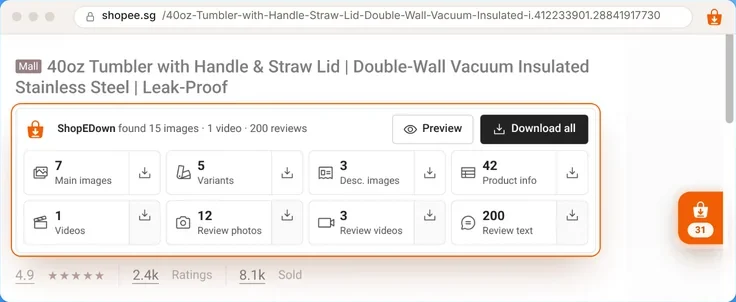
With ShopEDown installed in Chrome or Edge, open the Shopee listing whose reviews you want.
- 2
Choose which reviews
The Review text tile exports 200 reviews by default. Raise it to 500, or switch to 1 to 3 stars only.
- 3
Open reviews.xlsx
One row per review with a sentiment label, plus a summary sheet. Review photos and videos land in their own folders.
What It Doesn't Do
- It exports one product's reviews at a time, from the page you have open. It doesn't crawl a whole shop or a search.
- Review export and sentiment are part of the paid plans. Product images and product info are free.
- Reviews belong to the buyers who wrote them. Use them for research, and don't present them as reviews of your own product.
Frequently Asked Questions
Can I scrape Shopee reviews without coding?
Yes. ShopEDown exports a product’s reviews to Excel and CSV from the product page in one click. General scraper extensions also need no code, but you set up which parts of the page to collect and handle Shopee’s review pages yourself.
How many Shopee reviews can I export?
With ShopEDown, 200 per product by default and up to 500. You can also export only 1 to 3 star reviews.
Does review sentiment analysis send my data anywhere?
No. Each review is labelled positive, neutral or negative on your device, so review text is not uploaded for it.
Is exporting reviews safe for my Shopee account?
ShopEDown loads reviews in small batches about a second apart and pauses for ten minutes if Shopee shows a security check. Browsing adds no requests at all.